Best Typing Tutor Software for Skill Development
A quality typing tutor software is essential for anyone serious about improving their keyboard skills. Whether you're a beginner learning to type or an experienced typist aiming for professional-level speed, the right typing tutor can accelerate your progress significantly. This comprehensive guide explores the features, benefits, and options available in modern typing tutor applications.
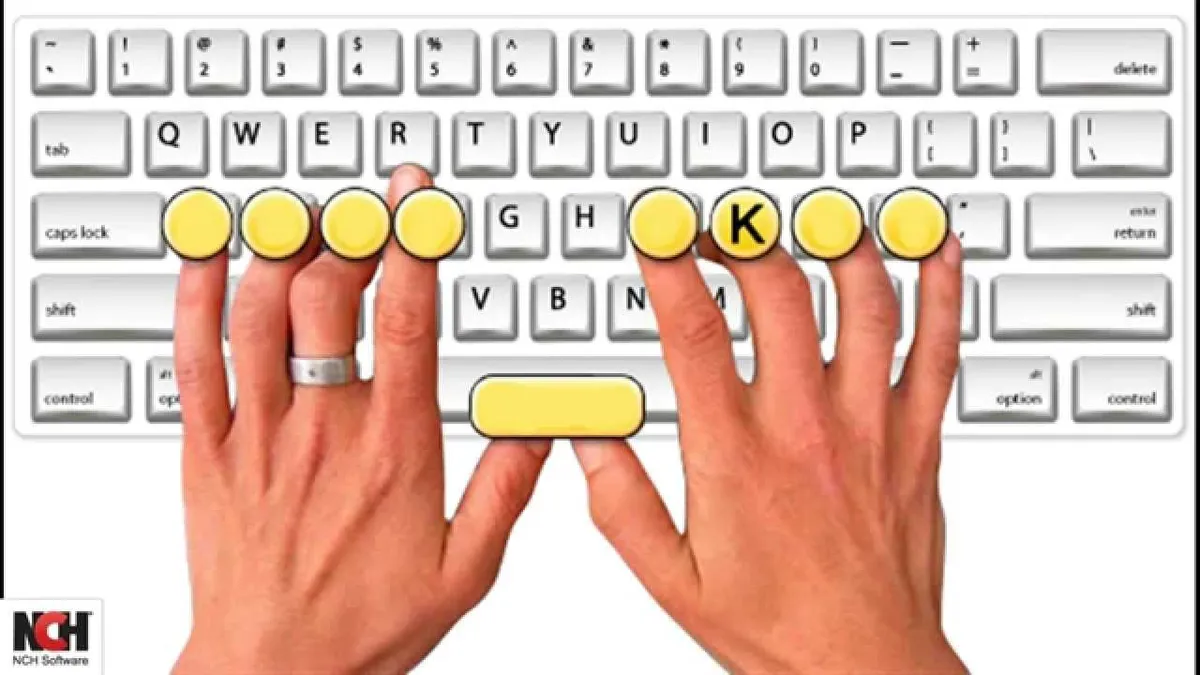
What is a Typing Tutor?
A typing tutor is specialized software designed to teach and improve typing skills through structured lessons, exercises, and practice activities. Unlike casual typing games, typing tutor software provides systematic instruction in proper technique, finger placement, and speed development.
Key Features of Quality Typing Tutor Software
- Structured Lessons: Progressive curriculum from beginner to advanced levels
- Real-time Feedback: Immediate correction of errors and performance metrics
- Speed and Accuracy Tracking: Detailed statistics showing progress over time
- Customizable Difficulty: Adjustable lesson complexity to match your skill level
- Interactive Exercises: Engaging activities that make learning enjoyable
- Performance Analytics: Comprehensive reports on typing patterns and improvements
Why Use a Typing Tutor?
Investing time in a professional typing tutor offers numerous advantages over self-directed practice:
Structured Learning Path
Typing tutor software provides a logical progression from basic skills to advanced techniques. This structured approach ensures you build a strong foundation before advancing, preventing the development of bad habits.
Professional Instruction
Quality typing tutors incorporate decades of typing instruction expertise. They teach proper technique, optimal finger placement, and proven speed-building strategies that might take years to discover independently.
Motivation and Engagement
Interactive typing tutor software keeps you engaged with progress tracking, achievements, and gamification elements. Seeing measurable improvement motivates continued practice.
Efficiency
A good typing tutor focuses your practice on areas needing improvement. Rather than random practice, you get targeted exercises that address your specific weaknesses.
Types of Typing Tutor Software
Online Typing Tutors
Web-based typing tutors are accessible from any device with internet access. They typically offer free basic versions with optional premium features. Popular online typing tutors include platforms that provide lessons, tests, and games in one interface.
Desktop Typing Tutor Applications
Standalone software installed on your computer often provides more advanced features and offline access. Desktop typing tutors may include comprehensive lesson libraries and detailed analytics.
Mobile Typing Tutor Apps
Smartphone and tablet applications allow you to practice typing on mobile devices. While limited by screen size, mobile typing tutors are convenient for quick practice sessions.
Typing Tutor Features Comparison
| Feature | Beginner Tutor | Intermediate Tutor | Advanced Tutor |
|---|---|---|---|
| Lesson Levels | 5-10 lessons | 20-30 lessons | 50+ lessons |
| Speed Tests | Basic 1-min test | Multiple durations | Customizable tests |
| Analytics | Basic WPM tracking | Detailed statistics | Advanced analytics |
| Games | 1-2 games | 5-10 games | 20+ games |
| Customization | Limited | Moderate | Extensive |
How to Choose the Right Typing Tutor
Assess Your Current Level
Determine whether you're a complete beginner, intermediate typist, or advanced user. Choose a typing tutor designed for your current skill level to ensure appropriate challenge and engagement.
Consider Your Learning Style
Some people prefer structured lessons, while others learn better through games and interactive exercises. Select a typing tutor that matches your preferred learning approach.
Evaluate Platform Compatibility
Ensure the typing tutor works on your devices. Whether you prefer desktop, web, or mobile, choose software that fits your workflow.
Check for Progress Tracking
Quality typing tutors provide detailed analytics showing your improvement over time. This feedback is crucial for staying motivated and identifying areas needing more practice.
Review User Support
Look for typing tutors with responsive customer support, comprehensive documentation, and active user communities.
Maximizing Your Typing Tutor Experience
Practice Consistently
Dedicate 20-30 minutes daily to your typing tutor. Consistency matters more than duration. Regular practice builds muscle memory faster than occasional long sessions.
Follow the Curriculum
Don't skip lessons or jump ahead. The structured progression ensures you develop proper technique before advancing to more complex material.
Focus on Accuracy
Your typing tutor will emphasize accuracy over speed. Trust the process. Speed naturally increases as accuracy improves.
Review Your Analytics
Regularly check your progress reports. Understanding your typing patterns helps you identify weaknesses and celebrate improvements.
Common Typing Tutor Mistakes to Avoid
- Rushing through lessons: Take time to master each lesson before advancing
- Ignoring posture: Proper positioning is taught in typing tutors for a reason
- Inconsistent practice: Sporadic practice is less effective than regular sessions
- Prioritizing speed over accuracy: Let your tutor guide you toward balanced improvement
- Skipping fundamentals: Strong basics are essential for long-term improvement
Conclusion: Invest in Your Typing Skills
A quality typing tutor software is an investment in your productivity and professional development. Whether you're a student, office worker, or aspiring typist, the right typing tutor can help you achieve your goals efficiently. Start with a reputable typing tutor today and experience the transformation in your keyboard skills.